
How to create a Meta Business Manager and a Page, step by step
Before your first ad, you need to create a Meta Business Manager, now called a “business portfolio” in Meta Business Suite. It’s the space that holds your Page, ad account, Pixel and the people who can access them.
Set up properly from the start, it saves you from lost access, restrictions and lockouts just when your ads start working. This guide gives the order of steps, the right settings and the practices to avoid, with links to Meta’s official help pages, since the interface changes regularly.
What a Meta Business Manager is made of
| Element | What it’s for | Note |
|---|---|---|
| Personal Facebook profile | Your real identity, to log in | One real, secured profile |
| Business portfolio (Business Manager) | Holds and controls the business’s assets | Created in Meta Business Suite |
| Facebook Page | The public face that runs the ads | One Page per brand |
| Ad account | Creates campaigns and pays for ads | Currency, time zone and payment method |
| Pixel (dataset) | Measures visits and orders | Linked to your stores and products |
| People and roles | Grant access to each asset | The minimum each person needs |
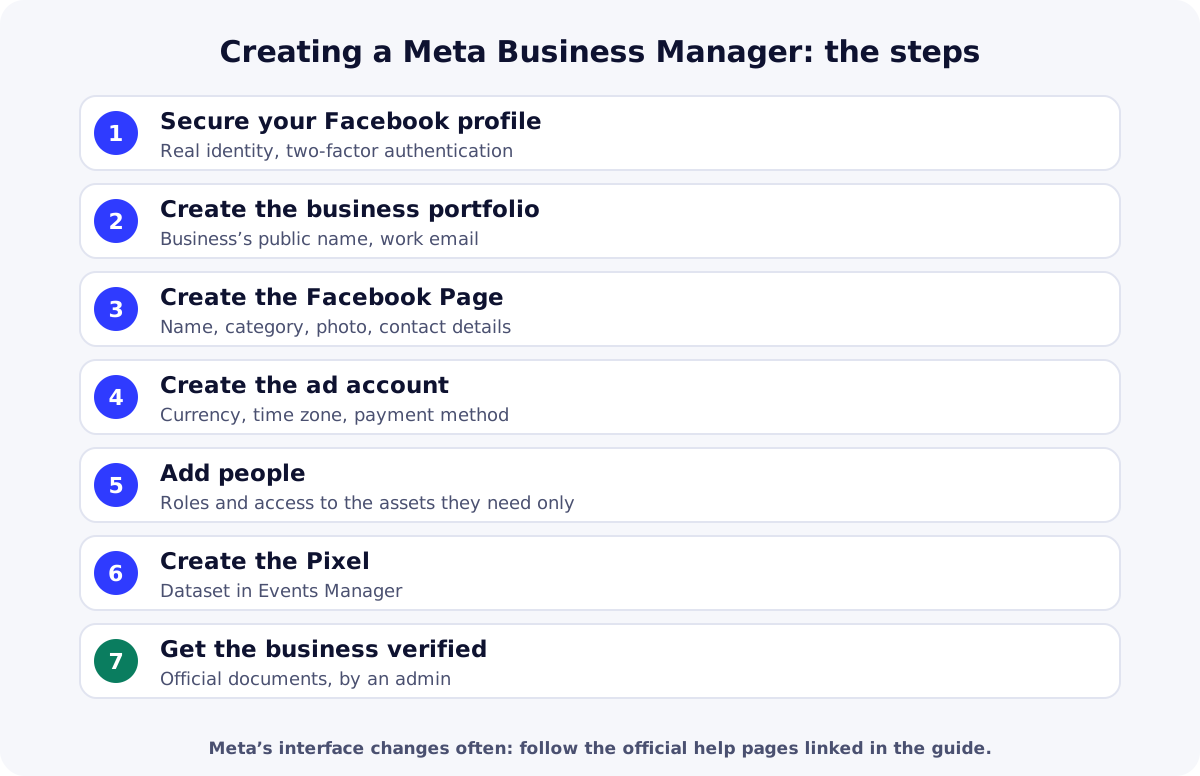
Create a Meta Business Manager in 7 steps
1. Secure your personal profile
Use your real Facebook profile, with your real name, and turn on two-factor authentication. Meta prohibits inauthentic accounts and accounts created to evade a restriction, under its account integrity rules: a fake or bought profile puts your whole portfolio at risk of being disabled.
2. Create the business portfolio
In Meta Business Suite, create a business portfolio by following the help page “Create a Business Portfolio”. Use your business or brand’s public name and a work email address you control.
3. Create the Facebook Page
Create your brand’s Page (Meta help: create a Facebook Page for your business): name, category, profile photo, cover, contact details. Post some real content before advertising: an empty Page inspires little trust in COD customers.
4. Create the ad account
Create the ad account inside the portfolio. Choose the currency (the one you’ll pay in) and time zone (your market’s or your reporting’s) carefully. Add a payment method Meta accepts: see accepted payment options and managing payment options.
5. Add people with the right access
Add your team or provider (Meta help: add people and assign assets), giving each person only the access they need. Keep a second trusted person as admin so you don’t lose access if your profile is locked. Turn on the two-factor authentication requirement for portfolio members.
6. Create the Pixel
In Events Manager, create your Pixel (dataset): it will measure product views, checkouts started and purchases. Install it with the Conversions API using our guide on installing the Meta Pixel and Conversions API.
7. Get the business verified
Business verification lets Meta gather information about you and your business to verify your identity as a business entity; only an admin can start it. It requires official documents in the business’s name: see the help page “Verify your business”.
Practices to avoid
- Buying an account, profile or portfolio: Meta prohibits using inauthentic assets, including Business Manager accounts, to evade enforcement (Advertising Standards).
- Creating new accounts after a restriction instead of requesting a review: see our guide on a disabled ad account.
- Sharing your login instead of adding the person with a role.
- Abruptly changing country, payment method and budget on the same day: sudden changes can trigger checks.
- Promising results (health, money) in ads: against Meta’s advertising rules.
| Need | Free option | Paid option |
|---|---|---|
| Manage Page, ads and access | Meta Business SuiteMeta’s free tool for businesses. | Ad agency or freelancerPaid service: add them as a person, don’t share your login. |
| Secure logins | Meta two-factor authenticationA requirement you can turn on for the whole portfolio. | Hardware security keyStrong method if Meta offers it for your account; buy a compatible key. |
Key takeaways
Taking the time to create a Meta Business Manager properly saves a lot later: a secured real profile, a portfolio in the business’s name, a Page, a well-configured ad account, limited access, a Pixel and verification. Next, see how to structure a test campaign. Create your ReadyStore store and connect your Pixel.
Sources
- Meta — Create a Business Portfolio (help center) (accessed 18 October 2026)
- Meta — Create a Facebook Page for your business (accessed 18 October 2026)
- Meta — Add people and assign business assets (accessed 18 October 2026)
- Meta — Turn on the two-factor authentication requirement (accessed 18 October 2026)
- Meta for Developers — Business verification (accessed 18 October 2026)
- Meta — Account integrity (Community Standards) (accessed 18 October 2026)
- Meta — Inauthentic behavior (Advertising Standards) (accessed 18 October 2026)
Frequently asked questions
Are Business Manager and business portfolio the same thing?
Yes. Meta now uses “business portfolio” in Meta Business Suite, but many sellers still say Business Manager. It’s the space that groups Pages, ad accounts, Pixels and people.
Do I need a company to create a Business Manager?
Not to create it: you need a real Facebook profile. Business verification, however, requires official documents in the business’s name, and may be useful or required for some features. Check your legal situation with a local professional.
Why add a second admin?
If your personal profile is locked or hacked, another trusted admin can keep access to the portfolio, Page and ad accounts. Only give full access to someone you genuinely trust.
Can I buy an already verified Business Manager?
No. Meta prohibits using inauthentic assets, including Business Manager accounts, to evade enforcement, and accounts created to get around a restriction are covered by its rules. It exposes you to being disabled and losing your ads.
Which currency should the ad account use?
The one you’ll pay for ads in, taking into account the payment methods Meta accepts in your country. Choose it carefully at creation, along with the time zone, as these settings shape your reports and invoices.
Related guides
Facebook ad account disabled: causes and the official appeal
Facebook ad account disabled or restricted: official causes, how to request a review from Meta, mistakes that make it worse and how to prevent it next time.
Read the guideAdvertisingHow to install Meta Pixel and Conversions API on your store
Install Meta Pixel and Conversions API on a COD store: credentials, ReadyStore settings, events sent, testing, deduplication and common mistakes.
Read the guideProduct researchFacebook Ad Library tutorial: spot products that sell
A Facebook Ad Library tutorial to spot products that sell: country search, which signals to read, the tool’s limits and a simple tracking method for COD sellers.
Read the guideStore for Facebook Ads
A store and tracking built for Meta campaigns: Pixel per product, CAPI, attribution and abandoned orders.
Learn more
You launch the store and the ads. The center does the rest.
Create your ReadyStore store: a short COD form, Meta Pixel and Conversions API, orders and analytics in one place.