
Facebook ads product testing: a campaign structure for COD
Facebook ads product testing should answer one question: can this product sell at a positive margin once orders are confirmed and delivered? Without a structure, you change everything at once, cut too early or too late, and never learn why a product worked or failed.
This guide sets out a simple structure built for cash on delivery: preparation, objective, ad sets, creatives, rules during the learning phase and a decision based on cost per delivered order. There is no “magic” budget here: it depends on your margin and on what you’re willing to lose per test.
Before Facebook ads product testing: set the rules
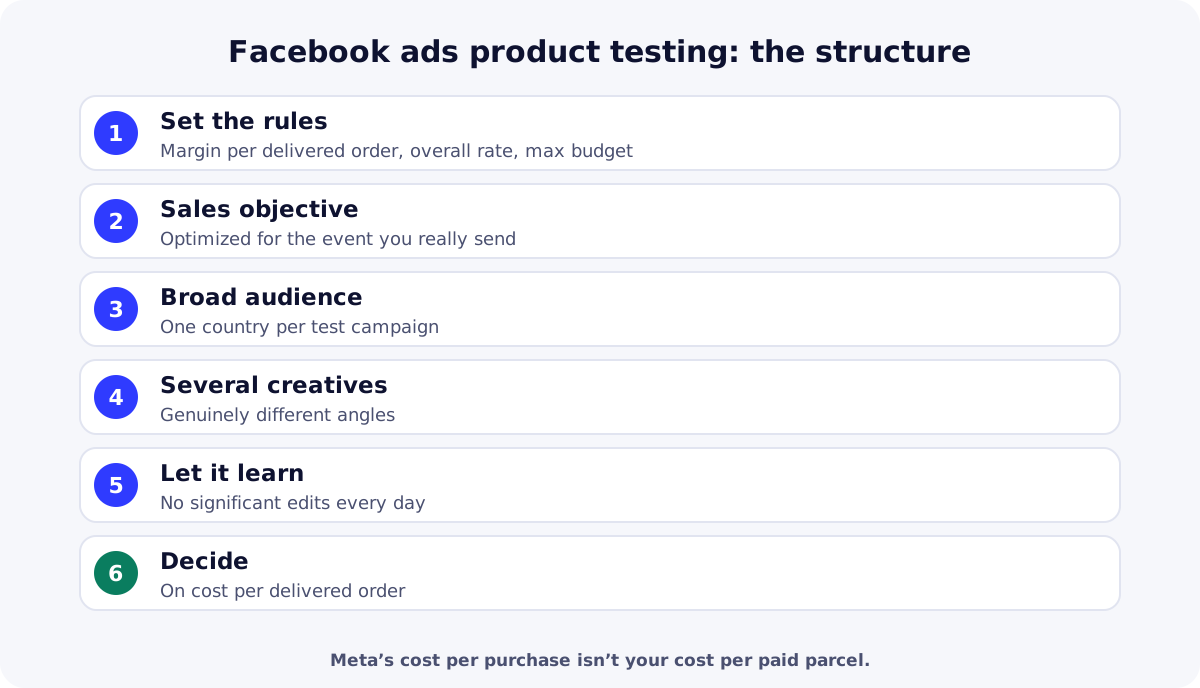
Write down three numbers before you spend anything:
- margin per delivered order before ads: selling price minus product cost, delivery and service fees, and the cost of returns (method in our COD profit calculation);
- your overall rate (delivered orders ÷ orders received), or a cautious assumption if you’re just starting;
- the test’s maximum budget: what you accept to lose if the product doesn’t work.
Check the basics too: Pixel and Conversions API received and deduplicated (see how to install Meta Pixel and Conversions API), a clear product page with price and delivery time visible, and a product chosen with a method (see finding a winning product).
Objective and optimization event
Meta groups campaign objectives into six families, including Sales (OUTCOME_SALES in the Marketing API reference) and Leads. For a COD store, a Sales objective optimized for the conversion event is the most direct choice. The event must be the one your Pixel really sends:
| Pixel mode | Event sent on order | Choose in the ad set |
|---|---|---|
| Purchase | Purchase, after the order is saved | Purchase |
| Lead | Lead, after the order is saved | Lead |
Ad sets and budget
There are two ways to split budget. Advantage+ campaign budget (formerly campaign budget optimization) automatically manages budget across several ad sets. Ad set budgets let you set each one’s spend yourself.
| Structure | How it works | When to use it |
|---|---|---|
| One ad set, several ads | One broad audience, 3 to 5 different creatives in the same ad set | Test interest in the product and let Meta find the best creative |
| Ad set budgets | One ad set per angle or offer, each with its own budget | Compare two offers (price, bundle) with controlled spend |
| Meta A/B test | Two versions that differ by one variable only | Isolate a variable once you have a product that sells |
Meta’s A/B testing tool lets you compare several ads to identify what improves your results. For a very first product test, a simple structure is often enough; A/B testing becomes useful once interest is confirmed.
Creatives: test angles, not details
What moves test results most is creatives that are genuinely different: a problem shown, a demonstration, everyday use, an offer. Changing only the text color teaches you almost nothing. To make these videos without a studio, see our guide to UGC ad creatives, and find inspiration in active ads with the Ad Library.
During the learning phase
After launch or a significant edit, an ad set goes through a learning phase. The Marketing API documentation describes three states: still learning, exited learning, or failed when the ad set isn’t generating enough results to exit. It also notes that a significant edit makes the ad set re-enter learning.
- Don’t change budget, audience and creatives every day: each significant edit restarts learning.
- Track daily orders received and their confirmation in your store, not just in Meta’s dashboard.
- Stick to your maximum budget: if it’s reached with no signal, stop.
Decide on cost per delivered order
Meta’s cost per purchase counts orders, not paid parcels. With COD, divide spend by delivered orders, or estimate it with your overall rate (see our guide to the COD delivery rate).
| Metric | Creative A | Creative B |
|---|---|---|
| Spend | 600 | 600 |
| Orders received | 15 | 8 |
| Cost per order received | 40 | 75 |
| Delivered orders | 8 | 3 |
| Cost per delivered order | 75 | 200 |
| Margin per delivered order before ads | 100 | 100 |
| Result per delivered order | +25 | −100 |
| Need | Free option | Paid option |
|---|---|---|
| Create and monitor the campaign | Meta Ads ManagerCreation, A/B tests and reports, no subscription. | Meta marketing partnerAgencies and tools listed by Meta, paid. |
| Calculate cost and margin per delivered order | Google SheetsOnline spreadsheet, usable with a Google account. | Microsoft Excel (Microsoft 365)Spreadsheet included in Microsoft 365 subscriptions. |
Key takeaways
Good Facebook ads product testing starts before launch: margin per delivered order, overall rate and maximum budget. A Sales objective on the right event, a broad audience, different creatives, few edits during learning, and a decision on cost per delivered order. Create your ReadyStore store to test products with one Pixel per product.
Sources
- Meta for Developers — Ad Campaign Learning Stage Info (accessed 18 October 2026)
- Meta for Developers — Ad Campaign (objectives) (accessed 18 October 2026)
- Meta — Advantage+ campaign budget (accessed 18 October 2026)
- Meta — A/B testing (accessed 18 October 2026)
Frequently asked questions
How much budget do I need to test a product on Facebook?
There’s no universal amount. Start from your margin per delivered order: the test budget should bring enough orders to judge, without exceeding what you accept to lose if the product fails. Set that cap before launch.
How long should a test run?
Long enough to get orders, then their confirmations and deliveries, which come a few days later. Avoid judging after a few hours, and stop if the maximum budget is reached with no orders.
Should I choose the Sales or Leads objective?
For a COD store that sends a Purchase event on each order, a Sales objective optimized for Purchase is the most direct. If your Pixel is in Lead mode, optimize for Lead. What matters is that the chosen event is the one your store actually sends.
What is Meta’s learning phase?
It’s the period when Meta explores delivery for an ad set after launch or a significant edit. According to Meta’s documentation, a significant edit sends the ad set back into learning, so avoid changing everything every day.
Why not judge on Meta’s cost per purchase?
With cash on delivery, some orders are never confirmed or delivered. Meta’s cost per purchase is therefore lower than your real cost per paid parcel. Calculate cost per delivered order to know whether the product is profitable.
Related guides
How to install Meta Pixel and Conversions API on your store
Install Meta Pixel and Conversions API on a COD store: credentials, ReadyStore settings, events sent, testing, deduplication and common mistakes.
Read the guideAdvertisingUGC ad creatives: shooting video ads that sell without a studio
UGC ad creatives without a studio: formats Meta and TikTok recommend, a five-part script, smartphone shooting, creator consent and the ad rules to follow.
Read the guidePillar guideHow to find winning products for Africa and the Gulf
How to find winning products for COD in Africa and the Gulf: proof of demand, COD filters, margin per delivered order, sourcing, a scoring grid and testing.
Read the guideStore for Facebook Ads
A store and tracking built for Meta campaigns: Pixel per product, CAPI, attribution and abandoned orders.
Learn more
You launch the store and the ads. The center does the rest.
Create your ReadyStore store: a short COD form, Meta Pixel and Conversions API, orders and analytics in one place.