
Facebook ad account disabled: causes and the official appeal
A Facebook ad account disabled in the middle of a winning campaign is one of the worst situations for a COD seller: no ads, so no orders. The temptation to open a new account straight away is strong. That’s exactly what you shouldn’t do.
Based on the rules Meta publishes, this guide explains why accounts get restricted, how to request a review through the official route, what makes things worse, and how to lower the risk in future. No workarounds: they break Meta’s rules and end up costing more.
Why an ad account gets disabled
In its review and restriction guidelines, Meta lists reasons for restriction including:
- severely or repeatedly violating its policies;
- evading or attempting to evade its review process and enforcement actions;
- using inauthentic user accounts to set up business assets and run ads;
- managing business assets connected to other abusive assets, or behaving like assets already taken down.
Meta’s Advertising Standards also state that signals of possible misrepresentation, suspicious activity or inauthentic behavior can lead Meta to require verification. For a COD seller, the most common practical causes are ads promising results (health, weight loss, earnings), restricted products, a misleading landing page, or assets linked to accounts already sanctioned.
Facebook ad account disabled: the official process
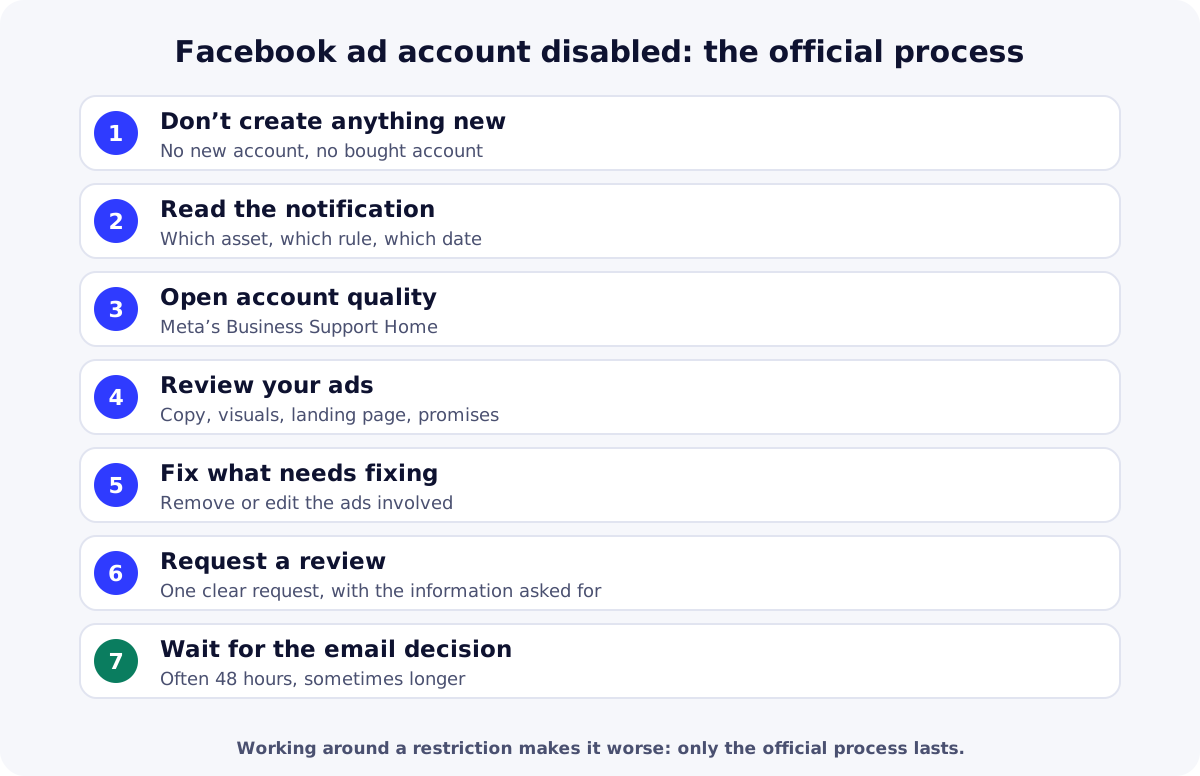
- Don’t create a new account. Meta prohibits helping anyone evade or circumvent enforcement of its policies, and targets accounts created to evade a previous removal (account integrity).
- Read the notification: which asset is affected (ad account, Page, profile, portfolio) and which rule is cited.
- Open account quality in Meta’s Business Support Home, where restrictions and available options appear.
- Review your ads: copy, visuals, video, landing page, promises, product. Compare them with the Advertising Standards.
- Fix what’s wrong: remove or edit the ads involved, correct the sales page.
- Request a review. According to Meta, if you believe an ad account, user account, Page or business account was incorrectly restricted, you can request a review of the decision in Business Support Home. Answer exactly what is asked (identity or business verification if needed).
- Wait for the decision. Meta says reviews are typically completed within 48 hours, sometimes longer, and the decision is sent by email.
What to say in your review request
- The facts: which asset is restricted, since when, and which notification you received.
- What you sell: the product, the country, cash on delivery, without exaggeration.
- What you fixed: ads removed or edited, sales page updated.
- Your real identity: ready to be verified if Meta asks.
- A factual tone: one clear request is better than several messages.
During the review: protecting your business
- Tell your center if order volume is about to drop, so it can adjust confirmation and stock.
- Keep your data: your orders, customers and analytics stay in your store, independent of Meta.
- Work your abandoned orders: details left without confirming can be followed up by phone.
- Prepare compliant ads for the restart, with verifiable promises.
Lowering the risk of being disabled
| Practice | Why |
|---|---|
| Real profile, two-factor authentication, second admin | Less risk of hacking and lost access |
| Business verification | Meta may require verification when signals look suspicious |
| Ads without results promises | Health, weight-loss or earnings promises are restricted |
| Honest sales page consistent with the ad | Price, lead times, returns and cash on delivery clearly shown |
| Gradual budget increases | Avoids sudden changes that trigger checks |
| No assets linked to sanctioned accounts | Links to abusive assets are a restriction reason |
To set up your assets properly from the start, see our guide on how to create a Meta Business Manager, and to pick products that fit the rules, our pillar guide on how to find winning products.
| Need | Free option | Paid option |
|---|---|---|
| Check rules before publishing | Meta Advertising StandardsOfficial rules, free. | Specialist ad agencyAd review (paid); add them with a role, don’t share your login. |
| Track the status of your assets | Meta Business SuiteAccount quality and notifications, free. | Specialist ad agencyOngoing account monitoring (paid service). |
Key takeaways
With a Facebook ad account disabled: no new account, read the notification, review and fix your ads, request a review in Business Support Home and wait for the email decision. Then prevent it with well-configured assets and compliant ads. Create your ReadyStore store: your orders and customers stay yours, whatever happens to your ads.
Sources
- Meta — Review and restriction guidelines (accessed 18 October 2026)
- Meta — Advertising Standards (accessed 18 October 2026)
- Meta — Inauthentic behavior (Advertising Standards) (accessed 18 October 2026)
- Meta — Account integrity (Community Standards) (accessed 18 October 2026)
- Meta — Request a review if you are restricted from advertising (accessed 18 October 2026)
Frequently asked questions
How long does an ad account review take?
According to Meta, reviews are typically completed within 48 hours, but can sometimes take longer. The decision is sent by email. In the meantime, avoid sending repeated requests or creating other accounts.
Can I create a new ad account to keep going?
No. Meta prohibits evading or attempting to evade its enforcement, and its rules target accounts created to get around a removal or owned by the same person as a disabled account. That can extend the penalty to all your assets.
Where do I request a review?
Meta says you can request a review of the decision in Business Support Home, and its Advertising Standards also mention Account Quality. Open the notification you received: it shows the affected asset and the path to follow.
What if the review is rejected?
Reread the rules cited, fix the underlying issue for good (product, promises, sales page) and follow the options Meta offers in your space. Don’t use bought accounts or services that promise to “unlock” an account: that breaks the rules.
Are COD products riskier?
Cash on delivery isn’t a problem in itself. The risk comes from restricted products, results promises and misleading sales pages. An honest offer with a clear price and return terms remains the best protection.
Related guides
How to create a Meta Business Manager and a Page, step by step
Create a Meta Business Manager (business portfolio), a Facebook Page, an ad account and a Pixel, secure access and get your business verified the right way.
Read the guideAdvertisingHow to install Meta Pixel and Conversions API on your store
Install Meta Pixel and Conversions API on a COD store: credentials, ReadyStore settings, events sent, testing, deduplication and common mistakes.
Read the guidePillar guideHow to find winning products for Africa and the Gulf
How to find winning products for COD in Africa and the Gulf: proof of demand, COD filters, margin per delivered order, sourcing, a scoring grid and testing.
Read the guideStore for Facebook Ads
A store and tracking built for Meta campaigns: Pixel per product, CAPI, attribution and abandoned orders.
Learn more
You launch the store and the ads. The center does the rest.
Create your ReadyStore store: a short COD form, Meta Pixel and Conversions API, orders and analytics in one place.