
COD order confirmation: do it yourself or delegate, plus a script
COD order confirmation is the step between a filled-in form and a shipped parcel. A call or message that checks the product, price, address and the customer’s availability avoids shipping parcels that will be refused, and it’s often the quickest lever for improving your delivery rate.
This guide compares three ways to organize confirmation (yourself, someone on your team, a center), gives a complete call script, answers to common objections, the WhatsApp rules to follow and how to record each outcome.
COD order confirmation: yourself, a team or a center
| Setup | Benefits | Limits |
|---|---|---|
| Yourself | You hear customers and their objections first-hand | Time-consuming, hard to sustain as orders grow |
| Someone on your team | Control over script and language, hours suited to the country | Hiring, training and quality checks are on you |
| The service center | Team already in place, often tied to delivery | Variable quality: attempts, hours, languages, reasons provided |
Many sellers confirm orders themselves for the first few weeks: it’s the best way to write a script that answers real questions, before handing it to a team or center.
The confirmation call script
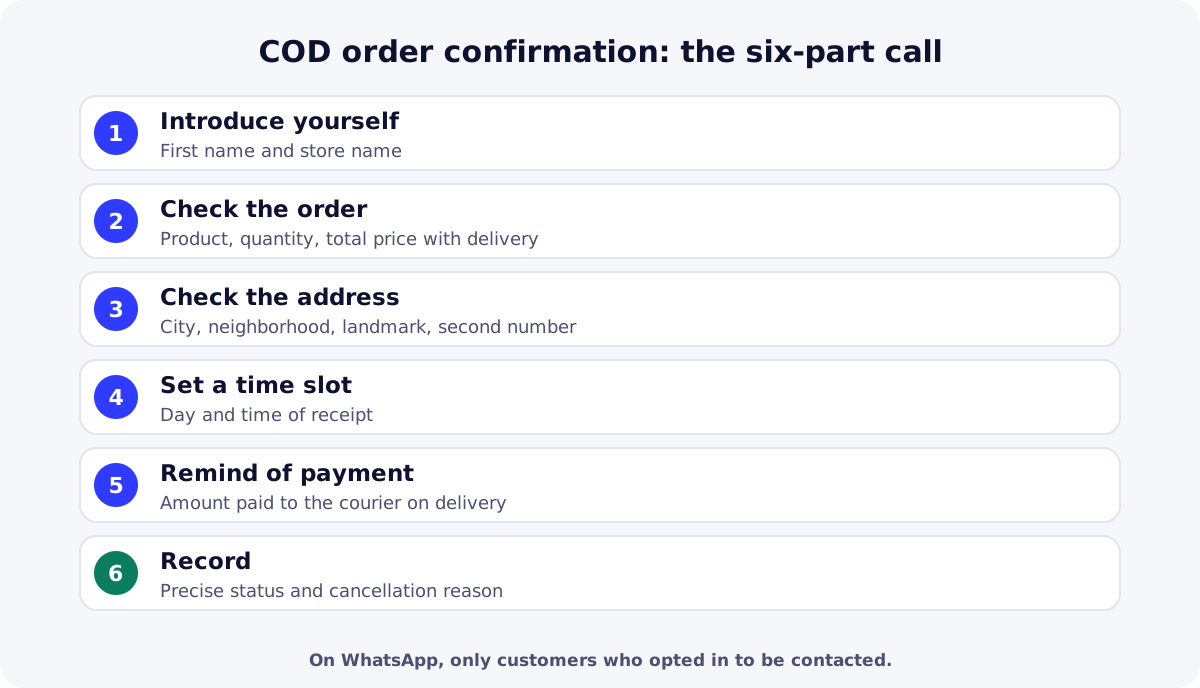
- Introduce yourself: “Hello, this is [first name] from [store name]. You ordered [product] today; I’m calling to confirm.”
- Check the order: product, color or size, quantity, and total price including delivery.
- Check the address: city, neighborhood, a precise landmark, and a second number if possible.
- Set a time slot: the day and time the customer can receive the parcel.
- Remind them of payment: “You’ll pay [amount] to the courier on delivery.”
- Thank them and record the outcome right away, with the right status.
Handling common objections
| What the customer says | Possible answer | Status to record |
|---|---|---|
| “I didn’t order anything” | Apologize, check the name, don’t insist | Annulée (cancelled: no order) or Mauvais numéro (wrong number) |
| “Call me back later” | Ask for an exact time and note it | Rappelé plus tard (call back later) |
| “It’s too expensive” | Recall what’s included (delivery, pay on receipt) without inventing a discount | Confirmée (confirmed) or Annulée (reason: price) |
| “When will it arrive?” | Give the center’s real lead time, not an optimistic one | Confirmée (confirmed) |
| No answer | Try again at other times, then message if the customer agreed | Injoignable (unreachable) or Occupé (busy) |
Confirming on WhatsApp: the rules
The WhatsApp Business Policy only allows you to contact people who gave you their number and opted in to receive your messages; it also requires you to respect a person’s request to stop. According to Meta’s opt-in guide, businesses must clearly state their name and that the person is opting in to receive their messages, and comply with applicable law.
| Tool | For whom | Cost |
|---|---|---|
| WhatsApp Business app | Small businesses, conversations from a phone | Free to download |
| WhatsApp Business Platform (API) | Medium and enterprise businesses, messaging built into software | Charged per delivered template message, since July 1, 2025 |
Measuring confirmation quality
- Confirmation rate: confirmed orders ÷ orders received, by product and country.
- Time to first call: the time between the order and first contact.
- Cancellation reasons: sort them weekly to fix the offer or page.
- Delivery rate of confirmed orders: confirmation that’s too “easy” shows up as refusals at the door.
Exact definitions and reconciling with the center’s statement are covered in our guide to the COD delivery rate. To check a product stays profitable after confirmation, see also Facebook ads product testing.
| Need | Free option | Paid option |
|---|---|---|
| Contact customers | WhatsApp Business appFree, for customers who agreed to be contacted. | WhatsApp Business PlatformCharged per delivered template message, via a provider or directly. |
| Share the list to confirm | Google SheetsList shared with your team or center. | Microsoft Excel (Microsoft 365)Shared spreadsheet, included in Microsoft 365 subscriptions. |
Key takeaways
Good COD order confirmation is fast, clear and honest: introduce yourself, check the order, address and time slot, remind the customer they pay on delivery, then record the right status and reason. Start yourself to write the script, then delegate while tracking the same metrics. Create your ReadyStore store to track every confirmation by status.
Sources
- WhatsApp — WhatsApp Business Policy (accessed 18 October 2026)
- Meta for Developers — WhatsApp: getting opt-in (accessed 18 October 2026)
- Meta for Developers — WhatsApp: pricing (accessed 18 October 2026)
- WhatsApp — WhatsApp vs WhatsApp Business (accessed 18 October 2026)
Frequently asked questions
Why confirm a COD order?
Because with cash on delivery, the customer hasn’t paid anything yet. Checking product, price, address and availability before shipping avoids refused or undeliverable parcels, which cost fees and bring nothing in.
How soon after the order should I call?
As early as possible, while the customer still remembers ordering. Set a target and measure the real time to first call: it’s one of the most useful metrics for improving confirmation.
Can I confirm on WhatsApp?
Yes, if the customer gave you their number and opted in to receive your messages, as the WhatsApp Business Policy requires. Introduce yourself with the store name and respect a customer’s request to stop being contacted.
What if the customer doesn’t answer?
Try again at different times, send a message if the customer agreed to be contacted, and record the unreachable or busy status. Set a clear rule, such as a number of attempts before cancelling, and apply it to every order.
Should I hand confirmation to my service center?
It’s often convenient as orders grow. Check in the contract whether confirmation is included or billed, how many attempts are made, in which languages, and whether the center provides the reason for each cancellation.
Related guides
COD delivery rate: the numbers to demand from your center
COD delivery rate and confirmation rate: exact definitions, statements to demand from your center, reconciling them with your orders and diagnosing gaps.
Read the guideGetting startedCOD fulfillment center: what it does and how to choose one
What a COD fulfillment center does (stock, confirmation, delivery, cash collection) and 7 criteria to choose one: fees, lead times, remittance and statements.
Read the guideStoreHow to create a COD online store with ReadyStore: tutorial
Create a COD online store step by step with ReadyStore: store setup, customization, product, bundle offers, stock, Meta Pixel, custom domain and a test order.
Read the guideOrder management
Statuses, bulk actions, stock tied to statuses, exports and Google Sheets and logistics integrations.
Learn more
You launch the store and the ads. The center does the rest.
Create your ReadyStore store: a short COD form, Meta Pixel and Conversions API, orders and analytics in one place.