
WhatsApp Business for ecommerce: catalog, replies and follow-ups
WhatsApp Business for ecommerce is often where cash on delivery sales are won or lost: customers use it to ask a question before ordering, confirm their address or check on a parcel. For a COD store, it’s a valuable channel: it reassures buyers before they order, speeds up confirmation and lets you follow up with a customer who left their number.
This guide explains the difference between the WhatsApp Business app and platform, how to set up your profile, catalog and quick replies, how to run follow-ups by the rules, and what messages cost. The confirmation call script itself has its own guide.
WhatsApp Business for ecommerce: app or platform?
| Criterion | WhatsApp Business app | WhatsApp Business Platform (API) |
|---|---|---|
| Who it’s for | Small businesses, chats from a phone | High volume, several agents, messages sent from software |
| Setup | Download on Android or iPhone | Through a solution provider or directly with Meta |
| Cost | Free to download | Billed per delivered message, by country and category |
| Starting a conversation | With customers who gave you their number and consent | Only with an approved message template |
| Automation | Greeting message, away message, quick replies | Integration with your tools, chatbots, notifications |
Setting up WhatsApp Business for an online store
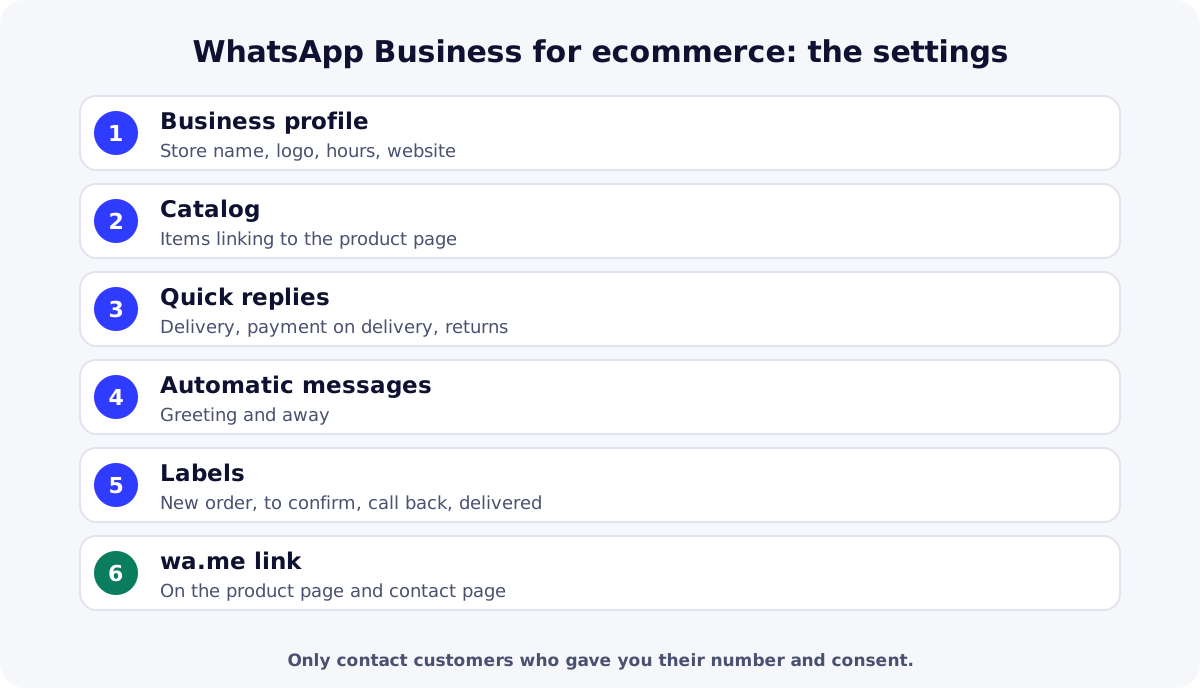
Your business profile
Fill in the store name, a profile photo (your logo), a short description, reply hours, your website address and an email. Use the same name as on your store and your ads: customers should instantly recognize who is messaging them.
The WhatsApp catalog
According to the WhatsApp Help Center, you create the catalog from the Tools tab: each item needs a name and a country of origin, and can hold up to 10 photos or videos, a price, a description, a link to the product page and a product code. Every image is reviewed against WhatsApp’s policies, and prices can only be shown in some countries. For a COD store, the catalog is mainly a showcase: add the link to the product page, where the customer orders with the form (see how to create a COD online store).
Quick replies
Quick replies store up to 50 messages, which you call up by typing “/” in a chat. Prepare the ones you need every day: delivery time, payment on delivery, returns, sizes or colors, and the request for an address with a landmark.
Greeting message, away message and labels
The greeting message is only sent when a customer messages you for the first time or after 14 days without contact. The away message answers outside your hours. Labels sort conversations (for example “New order”, “To confirm”, “Call back”, “Delivered”): the bare minimum to avoid losing customers when orders grow.
A wa.me link on your store
The click to chat link opens a chat with your number: https://wa.me/ followed by the number in full international format, without leading zeros, spaces or dashes. Add ?text= to pre-fill a message. Put it on the product page or contact page for customers who have a question before ordering.
Follow-ups and confirmation on WhatsApp: the rules
The WhatsApp Business Messaging Policy only lets you contact people who have given you their number and opted in to receive your messages. It requires you to respect any request to stop and, on the platform, to start conversations only with an approved message template. In practice, for a COD store:
- Get consent: a clear note on the product page, then a simple question at first contact, such as “May we message you on WhatsApp about your order?”.
- Confirm: the confirmation message repeats the product, the total price including delivery, the address and payment on delivery (the full script is in our guide to COD order confirmation).
- Follow up on an abandoned order: one useful message about the order they started, never a stream of promotions.
- Share tracking updates: parcel dispatched, courier on the way, and a quick reply if the order is refused or postponed.
How much does the WhatsApp Business Platform cost?
The app is free to download. The platform is paid: according to Meta’s pricing page, it has been billed per delivered message since July 1, 2025, with categories (marketing, utility, authentication, service) and rates by country. Since October 1, 2026, service messages and utility templates sent within the 24-hour window opened by the customer are charged again, with 1,000 free service messages per month per phone number. Solution providers often add their own subscription.
An example to decide: if one person handles 40 chats a day from a phone, the app is enough. If three people need to answer from the same number, with automatic tracking notifications for hundreds of orders in naira, shillings or dirhams, the platform becomes useful; then compare the message cost with the time saved. If a service center confirms your orders, ask how it uses WhatsApp (see our guide to choosing a COD fulfillment center).
| Need | Free option | Paid option |
|---|---|---|
| Answer customers | WhatsApp Business appProfile, catalog, quick replies, automatic messages. | WhatsApp Business PlatformSeveral agents and messages from software, billed per message. |
| Track customers to follow up | Google SheetsShared list, fed by the ReadyStore sync. | Microsoft Excel (Microsoft 365)Shared spreadsheet, included in Microsoft 365 plans. |
Summary
WhatsApp Business for ecommerce helps a COD store reassure buyers before they order, confirm faster and follow up with customers who left their number. Start with a well-configured app, respect customer consent, then move to the platform when volume demands it. To measure the effect on deliveries, track your COD delivery rate. Create your ReadyStore store to keep every number and status in one place.
Sources
- WhatsApp — Business Messaging Policy (accessed 21 October 2026)
- Meta for Developers — WhatsApp pricing (accessed 21 October 2026)
- WhatsApp Help Center — How to create and maintain a catalog (accessed 21 October 2026)
- WhatsApp Help Center — How to use click to chat (accessed 21 October 2026)
Frequently asked questions
Is WhatsApp Business free?
The WhatsApp Business app is free to download on Android and iPhone. The WhatsApp Business Platform (API), used for several agents and automated messages, is billed per delivered message depending on the message category and country, often with a solution provider’s subscription on top.
What is the difference between WhatsApp and WhatsApp Business?
WhatsApp Business adds features for companies: a business profile, a catalog, quick replies, greeting and away messages, and labels to sort conversations. Customers message you from their usual WhatsApp and can see that your account is a business account.
Can I message all my customers on WhatsApp Business?
Only those who gave you their number and agreed to receive your messages. In the app, a broadcast list only reaches contacts who have saved your number. Also respect any request to stop: an annoyed customer can block or report your account.
How do I create a WhatsApp link for my store?
Use https://wa.me/ followed by your number in full international format, without leading zeros, spaces or dashes. Add ?text= and an encoded message to pre-fill the customer’s question. Place the link on your store’s product page or contact page.
Should I confirm COD orders on WhatsApp or by phone?
Both work. A call is often faster to clear up a doubt, while a message keeps a written record of the address and amount. Many sellers call first, then send a summary message to customers who agreed to be contacted on WhatsApp.
Related guides
COD order confirmation: do it yourself or delegate, plus a script
COD order confirmation: call or WhatsApp, doing it yourself or using a center, a full call script, answers to objections and the statuses to record.
Read the guideOperationsCOD delivery rate: the numbers to demand from your center
COD delivery rate and confirmation rate: exact definitions, statements to demand from your center, reconciling them with your orders and diagnosing gaps.
Read the guideGetting startedCOD fulfillment center: what it does and how to choose one
What a COD fulfillment center does (stock, confirmation, delivery, cash collection) and 7 criteria to choose one: fees, lead times, remittance and statements.
Read the guideAbandoned orders
Keep the details visitors entered without a final order and choose the Meta behavior per Pixel.
Learn more
You launch the store and the ads. The center does the rest.
Create your ReadyStore store: a short COD form, Meta Pixel and Conversions API, orders and analytics in one place.