
How to write product descriptions that sell: a COD template
Knowing how to write product descriptions is only half the job: the description sits inside a product page with a title, photos, price, reviews and an order form. With cash on delivery, that page is often the only one a customer sees between the ad and the order. It has to answer their questions without a salesperson, on a phone, in seconds.
This guide gives the structure of a product page that sells with COD, a template to copy, examples by product type, advice on photos and proof, and the mistakes that cost orders or refused parcels.
The structure of a product page that sells with COD
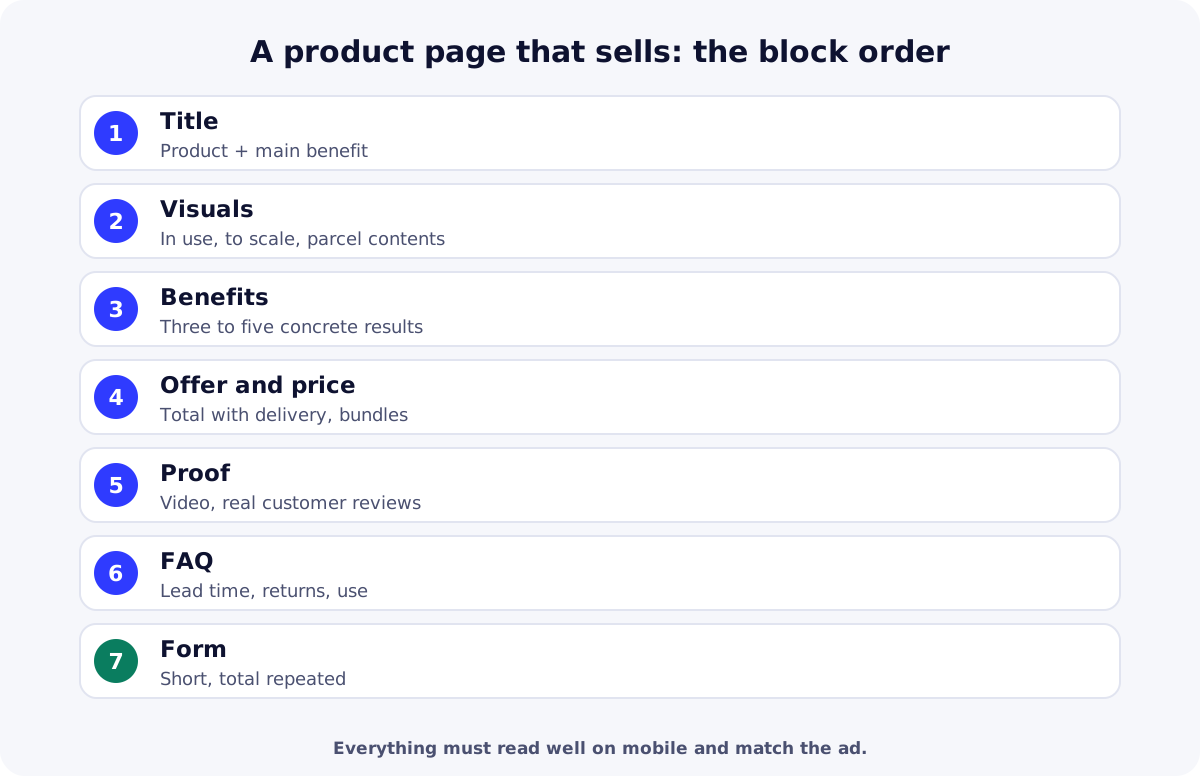
| Block | What it must say | Common mistake |
|---|---|---|
| Title | The product and its main benefit | A technical name or supplier reference |
| Visuals | The product in use, its real size, what’s in the box | Only supplier photos on a white background |
| Benefits | Three to five concrete results for the customer | A list of specs with no “what for” |
| Offer and price | Total price including delivery, bundles, payment on delivery | Fees that only appear at the end |
| Proof | Demo video, reviews from real customers | Invented or copied reviews |
| FAQ | Lead time, returns, use, size | No answer to real objections |
| Form | Short: name, phone, address | Too many fields on mobile |
How to write product descriptions: a template to copy
- Title: [Product] + [main benefit]. Example: “Heated straightening brush: smooth hair in 10 minutes, no flat iron”.
- Hook line under the title: the problem the product solves, in one sentence.
- Gallery: photo in use, photo of what’s in the box, photo for scale (in a hand), short video.
- Bullet benefits: three to five lines starting with a verb (“Smooths without damage”, “Heats in 60 seconds”).
- Offer: bundles of 1, 2 or 3 with the total price, delivery included or free, “Pay on delivery”.
- Description: how to use it, who it’s for, what’s included, dimensions and materials.
- Proof: customer or demo video, real reviews with first name and photo if the customer agrees.
- FAQ: real delivery time, what to do if it doesn’t suit, compatibility, care.
- Form with the total repeated just above the order button.
Product page examples by product type
| Product type | Must-have visual | Objection to answer |
|---|---|---|
| Beauty and care | Demonstration in use | “Will it work for me?” without promising guaranteed results |
| Home and kitchen | The product in a real room, to scale | Size, cleaning, durability |
| Fashion and accessories | Worn, several angles | Sizing: a clear guide and exchange process |
| Electronics and gadgets | Video of it working | Compatibility, battery life, warranty |
| Kids and baby | Real use, parcel contents | Safety, recommended age, materials |
Photos and video: what makes the difference
- A first photo in use: it must carry on from the ad.
- Exact parcel contents: the customer knows what they’ll receive, which reduces refusals.
- Scale: a hand, a familiar object or visible dimensions.
- A short video: 15 to 30 seconds of demo that works without sound.
- Image weight: compressed and correctly sized so the page loads fast on mobile.
Required information on a product page
In the European Union, Directive 2011/83/EU requires informing customers before they order of the product’s main characteristics, the total price including taxes and delivery, payment and delivery arrangements, and return conditions. Other countries have similar rules; with COD, showing the exact total is the best protection against refusals anyway.
| Need | Free option | Paid option |
|---|---|---|
| Edit photos | Canva (free plan)Cropping, backgrounds, text on visuals. | Adobe Express PremiumBackground removal and templates. |
| Compress images | SquooshCompression and WebP conversion in the browser. | TinyPNG (Web Pro)Batch compression. |
Summary
To write product descriptions that sell with COD, state the benefit in the title, show the product in use, announce the total price and offer clearly, prove it with real content and answer objections before the form. To build it step by step in ReadyStore, follow our guide to creating a COD online store, then prepare offers with upselling and cross-selling and test it with a product test campaign. Create your ReadyStore store to publish your first product page.
Sources
- EUR-Lex — Directive 2011/83/EU on consumer rights (accessed 21 October 2026)
- Meta — Advertising Standards (accessed 21 October 2026)
Frequently asked questions
How do you write a product description that sells?
Lead with the main benefit in the title, show the product in use, list three to five concrete benefits, state the total price and offer, add real proof and an FAQ covering objections. Then read it on a phone, the way your customers will.
How long should a product description be?
Long enough to answer the customer’s questions, no longer. A simple product can fit in a few bullets and a paragraph; a technical product needs a fuller description. Put the essentials at the top and the details further down for those who look for them.
What should a product page include?
A benefit-led title, photos and a video of the product in use, short benefits, the total price and offer, real reviews, a description with specs, an FAQ and the order form. With cash on delivery, also state the real delivery time and the exact parcel contents.
Can I use the supplier’s photos?
Only if the supplier allows it, and they’re rarely enough: many sellers use the same ones. Add at least one photo or video of the real product, in use and to scale, to stand out and show what the customer will actually receive.
What are good product page examples to follow?
Look for pages in your category that show the product in use first, answer sizing or compatibility questions clearly and display the total price without surprises. Study the ads running in your market too: the best product pages pick up exactly where the ad leaves off.
Related guides
Product photography with a smartphone and AI: an ecommerce guide
Product photography for ecommerce: great smartphone photos (light, background, angles), using AI without misleading customers, and free and paid tools.
Read the guideStoreEcommerce landing page examples: 10 that convert with COD
Ecommerce landing page examples for cash on delivery: 10 templates that convert, the structure of a landing page, mobile speed and the mistakes to avoid.
Read the guideStoreHow to create a COD online store with ReadyStore: tutorial
Create a COD online store step by step with ReadyStore: store setup, customization, product, bundle offers, stock, Meta Pixel, custom domain and a test order.
Read the guideStoreUpsell and cross-sell: definitions and COD store examples
Upsell and cross-sell explained: definitions, differences, examples for a cash on delivery store, bundle offers, the rules to follow and mistakes to avoid.
Read the guideAdvertisingFacebook ads product testing: a campaign structure for COD
Facebook ads product testing for COD stores: objective, ad sets, creatives, the learning phase and deciding on cost per delivered order, not cost per purchase.
Read the guideCash on delivery checkout
A short, mobile, reassuring order form: name, phone, address, quantity and a live total.
Learn more
You launch the store and the ads. The center does the rest.
Create your ReadyStore store: a short COD form, Meta Pixel and Conversions API, orders and analytics in one place.