
Upsell and cross-sell: definitions and COD store examples
An upsell offers the customer a more complete version or a larger quantity of the product they chose; a cross-sell offers a complementary product. Both raise the order value. With cash on delivery, it’s often the most direct profitability lever: one delivery, one confirmation call, but a higher amount.
This guide defines upselling, cross-selling and down-selling, gives concrete examples for a COD store, explains where to place them in the journey, and covers the rules that keep an offer from turning into a refused parcel.
Upsell, cross-sell, down-sell: definitions
| Technique | Principle | Example in a COD store |
|---|---|---|
| Upsell | More quantity or a better version of the same product | A 2-pack of creams at a lower unit price instead of one |
| Cross-sell | A product that complements the one chosen | A spare head with an electric toothbrush |
| Down-sell | A cheaper option for a hesitant customer | The basic model offered during the confirmation call |
Why upselling matters so much with cash on delivery
With COD, every order costs a delivery, often a confirmation call, and a refusal risk. Those costs are almost the same for one item or three. Raising order value spreads the fixed costs per parcel and improves margin per delivered order.
Worked example (assumptions): a product sold for KES 3,500 costs KES 900, and delivery costs KES 400 per parcel. Sold alone, it leaves KES 2,200 before ads. A 2-pack at KES 6,000 leaves 6,000 − 1,800 − 400 = KES 3,800 for the same delivery and ad cost. Check the effect on your offer with the margin calculator.
Upsell and cross-sell examples for a COD store
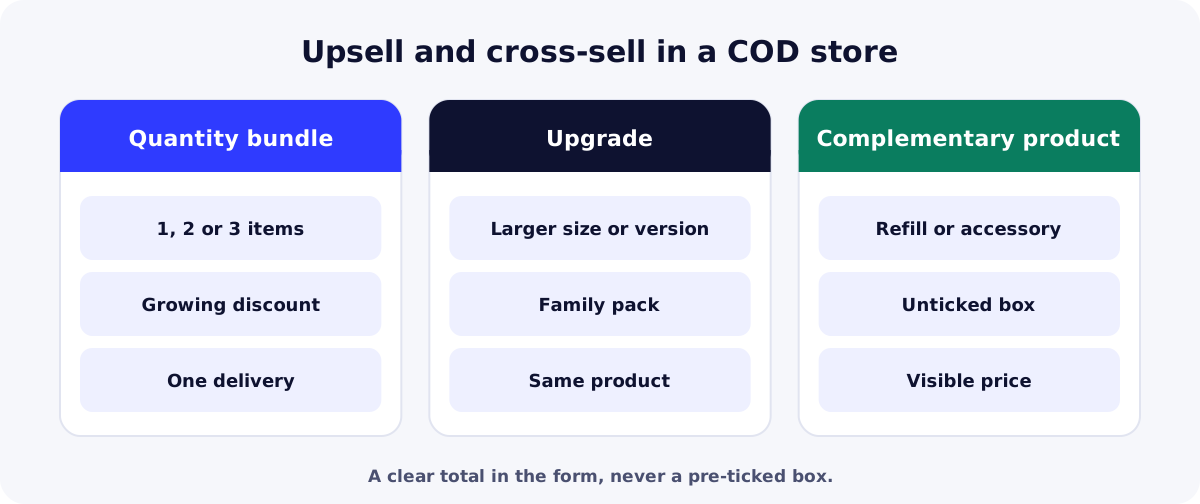
- Quantity bundle: 1, 2 or 3 items, with a growing discount and the middle option shown as most popular if it really is; it’s also the best offer for a peak such as Black Friday with COD.
- Free delivery from 2 items: a simple argument that costs less than a discount when delivery is shared.
- Complementary product: refill, accessory, case, care product; useful and consistent with the main product.
- Upgrade: a larger size, an extra color, a “family” pack, shown on a clear product page (see how to create a COD online store).
- During the confirmation call: mention the existing offer honestly and accept a no (see our guide to COD order confirmation).
Where to place upsells and cross-sells
| Placement | What works | Watch out for |
|---|---|---|
| Product page | Bundles visible near the price | Don’t bury the main offer |
| Order form | Bundles and add-ons to tick, total updated | No pre-ticked boxes |
| Confirmation call or message | Remind them of the existing offer | Never push |
| After delivery | Offer an add-on to satisfied customers | Only if they agreed to be contacted again |
The rules to follow
In the European Union, Directive 2011/83/EU (Article 22) requires the consumer’s express consent for any extra payment: an option added through a pre-ticked box isn’t valid. Beyond the law, it’s a matter of trust: with COD, a customer who finds an unexpected amount at the door often refuses the parcel.
The same care applies to a strikethrough price on a bundle: in the European Union, Directive 98/6/EC requires the lowest price of the last 30 days as the reference. “2 for the price of 1.5” is simpler and more honest than an inflated reference price.
Measuring the effect of an upsell
- Share of orders with a bundle or add-on: by product and by week.
- Average value of delivered orders: not just orders received (our upcoming guide on average order value covers the calculation).
- Delivery rate of orders with an offer: if it drops, the offer is misunderstood or too expensive.
- Margin per delivered order: the only metric that tells you whether the upsell really pays (see COD profitability).
| Need | Free option | Paid option |
|---|---|---|
| Bundle and add-on visuals | Canva (free plan)Product and bundle image templates. | Adobe Express PremiumTemplates, background removal and brand kit. |
| Track sales by offer | Google SheetsOrders by bundle, fed by the sync. | Microsoft Excel (Microsoft 365)Pivot tables by offer and by week. |
Summary
Upsells and cross-sells raise the value of each order without adding deliveries, which makes them a major lever with cash on delivery. Offer useful bundles and add-ons in the form, with a clear total and no pre-ticked box, then measure margin per delivered order. Create your ReadyStore store to set up bundles product by product.
Sources
- EUR-Lex — Directive 2011/83/EU on consumer rights (Article 22) (accessed 21 October 2026)
- EUR-Lex — Directive 98/6/EC (consolidated, Article 6a) (accessed 21 October 2026)
Frequently asked questions
What is the difference between an upsell and a cross-sell?
An upsell offers more of the same product or a better version, such as a 2-pack instead of one. A cross-sell offers another, complementary product, such as a case with a phone. Both raise order value and can be offered together.
What is a down-sell?
It’s the opposite of an upsell: offering a cheaper option to a customer who hesitates or declines, such as the basic model instead of the full one. With COD, it can prevent a cancellation during the confirmation call, as long as it stays an honest suggestion.
Which upsell works best with cash on delivery?
A 2- or 3-item bundle with a discount is often the easiest to understand and the most profitable, because it shares the delivery cost. Test it against free delivery and a complementary product, and compare margin per delivered order.
Can I pre-tick a complementary product?
No. In the European Union, any extra payment requires the customer’s express consent, and a pre-ticked box doesn’t count as consent. Everywhere else, it leads to refused parcels: customers should choose each add-on themselves.
How do I upsell during the confirmation call?
After confirming the order as placed, mention the existing offer in one sentence, with its total price. If the customer declines, keep the order without insisting. Record acceptances to learn which offers work over the phone.
Related guides
How to write product descriptions that sell: a COD template
How to write product descriptions and pages that sell with cash on delivery: the structure, a template to copy, examples by product type and mistakes to avoid.
Read the guideOperationsCOD order confirmation: do it yourself or delegate, plus a script
COD order confirmation: call or WhatsApp, doing it yourself or using a center, a full call script, answers to objections and the statuses to record.
Read the guideProfitabilityCost per delivered order: measuring real COD profit each week
Cost per delivered order in COD: every cost to count, a weekly review for each product and a simple grid to decide whether to keep, fix or stop a product.
Read the guideStoreHow to create a COD online store with ReadyStore: tutorial
Create a COD online store step by step with ReadyStore: store setup, customization, product, bundle offers, stock, Meta Pixel, custom domain and a test order.
Read the guideBundles and upsells
Per-product bundles, discounts, free delivery and complementary products offered inside the order form.
Learn more
You launch the store and the ads. The center does the rest.
Create your ReadyStore store: a short COD form, Meta Pixel and Conversions API, orders and analytics in one place.