
Multi-country Facebook ads: languages, currencies and Pixels
Running multi-country Facebook ads looks easy: just add countries to your targeting. With cash on delivery, that’s rarely a good idea as is, because each country has its own currency, delivery fees, service center, sometimes language, and therefore its own margin.
This guide explains how to organize stores, campaigns, languages, prices and Pixels when you sell in several countries, based on what Meta documents and one simple rule: an ad must lead to a page whose language, currency and delivery match the country of the person seeing it.
Multi-country Facebook ads: one store per market
A COD customer pays on delivery, in their currency, after a confirmation call in their language. One store per country lets you show the right price, fees and lead time, and work with that country’s service center. To start with a single market, see our guides to selling online in Africa and selling in the Gulf.
| Item | Why it changes | Where to set it |
|---|---|---|
| Currency and price | Purchasing power, competitor prices, local rounding | Country store |
| Delivery fees and time | Different carrier and distance | Country store and center |
| Language | One or several languages depending on the country | Store and ads |
| Service center | Local confirmation and delivery | Contract per country |
| Rules | Allowed products, mandatory notices, tax | Check per country, with a local professional |
One ad set per country, or several countries together?
Technically, one ad set can target several countries: the “countries” field in the Marketing API targeting reference takes a list of country codes. Meta doesn’t publish a rule on whether to group them; the choice depends on your stores.
| Setup | When to use it | Limit |
|---|---|---|
| One ad set (or campaign) per country | Different stores, currencies or delivery: the usual case in COD | You split budget between countries yourself |
| Several countries in one ad set | Same store, currency and delivery (for example two countries served by the same center) | Meta allocates delivery; read results per country in the breakdown |
Languages: Meta’s multi-language ads
In some countries, the audience reads several languages. Meta offers multi-language ads: you customize the image, video and text for each language, and Meta shows the right version to the right people. A default version is required: it’s shown when a person’s language matches none of the versions you set up.
- Adapt, don’t translate word for word: phrasing, arguments and examples must speak to local buyers.
- Keep the store language consistent: an Arabic ad leading to a French page loses part of the buyers.
- Confirm orders in the customer’s language (see our guide to COD order confirmation).
Currencies and prices: margin country by country
Don’t mechanically convert a price from one country to another. Purchase and import cost, delivery and service fees, delivery rate and ad cost all differ: calculate margin per delivered order for each market (method in our COD profit calculation), then set a price rounded to local habits.
Pixels: separate or shared data?
In ReadyStore, each store has its own Pixels and each product is linked to one Pixel. So you can either create a separate Pixel per market or enter the same dataset in several stores. It’s a strategy choice to make knowingly:
| Option | Benefit | Watch out |
|---|---|---|
| One Pixel per market | Data and audiences specific to each country, easy to read | Each Pixel builds only on its own data |
| One shared Pixel | Events from several countries feed the same dataset | Audiences and reports mix countries: filter by country |
Either way, installation is the same (see how to install Meta Pixel and Conversions API), and campaigns are tested country by country (see Facebook ads product testing).
| Need | Free option | Paid option |
|---|---|---|
| Adapt ad copy | Google TranslateFirst draft only; have a native speaker review it. | DeepL ProSubscription translation; human review still advised. |
| Compare margins by country | Google SheetsOne tab per country, same formulas. | Microsoft Excel (Microsoft 365)Spreadsheet included in Microsoft 365 subscriptions. |
Key takeaways
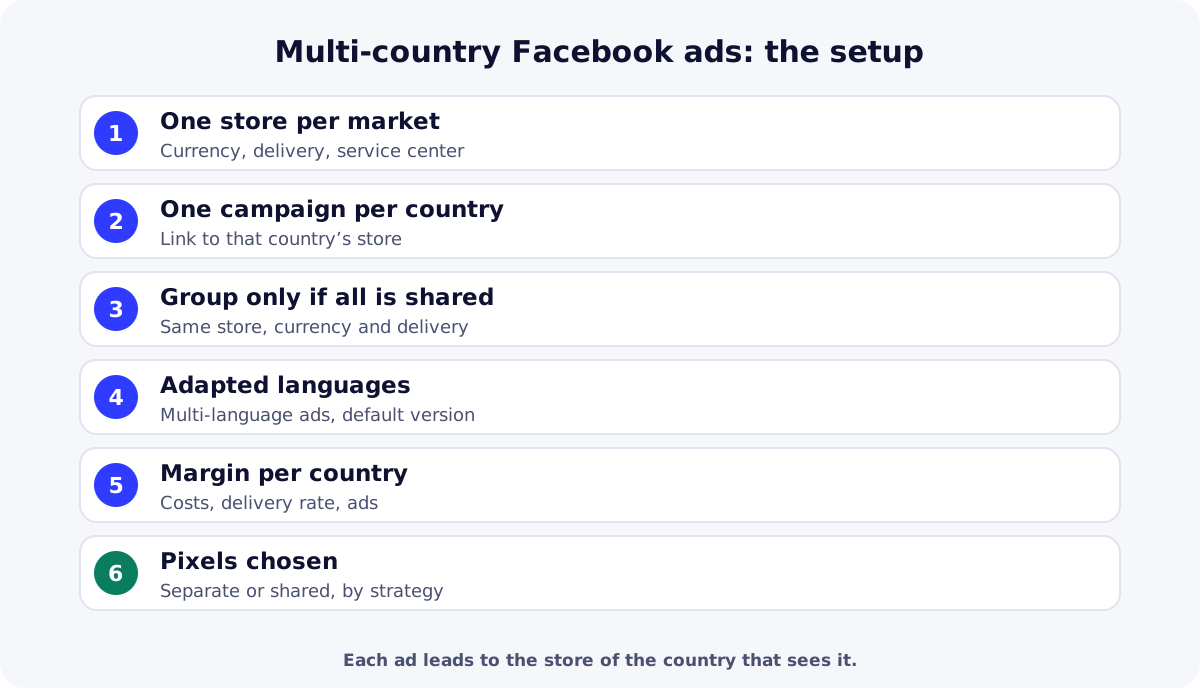
Multi-country Facebook ads work when each market has its own store, currency, delivery and center, and each ad leads to the right store. Group countries only when they share all of that, adapt languages, calculate margin per country and choose your Pixels knowingly. Create your ReadyStore store to open one market after another.
Sources
- Meta for Developers — Multi-language ads (accessed 18 October 2026)
- Meta for Developers — Basic targeting (countries) (accessed 18 October 2026)
Frequently asked questions
Can I target several countries in one Facebook campaign?
Yes: an ad set can target a list of countries. In COD, that only makes sense if those countries share the same store, currency and delivery. Otherwise, create one ad set or campaign per country, linking to that country’s store.
How do I run an ad in several languages?
Meta lets you create multi-language ads: you prepare image, video and text for each language, and Meta shows each person the right version. A default version is required for people whose language matches none of the versions.
Do I need one store per country?
With cash on delivery, it’s the simplest approach: each country has its own currency, delivery fees and times, and often its own service center. One store per market shows the right information and keeps orders and analytics separate.
Can one Pixel cover several countries?
Yes, as can one Pixel per market. A shared Pixel pools data from several countries; separate Pixels keep audiences and reports specific to each country. Choose based on your strategy and always filter results by country.
How do I set prices in each country?
First calculate margin per delivered order in each country (cost, delivery, service, delivery rate, ads), look at local prices, then round to local habits. Avoid simple currency conversion.
Related guides
How to sell online in Africa from anywhere in the world
How to sell online in Africa without living there: criteria to pick a COD market, 2026 figures by country, languages, currencies and a one-country-first method.
Read the guideGetting startedCOD ecommerce in Saudi Arabia and the Gulf: a practical guide
COD ecommerce in Saudi Arabia, the UAE, Kuwait and Oman: 2026 audiences, customer expectations, product compliance and the key steps to launch a first country.
Read the guideAdvertisingHow to install Meta Pixel and Conversions API on your store
Install Meta Pixel and Conversions API on a COD store: credentials, ReadyStore settings, events sent, testing, deduplication and common mistakes.
Read the guideMulti-store
Several stores, domains and teams in one workspace, with data kept separate per store.
Learn more
You launch the store and the ads. The center does the rest.
Create your ReadyStore store: a short COD form, Meta Pixel and Conversions API, orders and analytics in one place.